My friend Frank is a digital artist. He uses Blender to create renders and animations, and they are pretty fucking cool.
When I saw one of his instagram posts, I wanted to see all of the stuff he created so far. I clicked on his profile, just to find out the only place I can see it all besides instagram is Pinterest. The horror!

And I thought websites were invented to be viewed. Smh my head 🙄
Well, this is why I, the great friend I am, decided to make him a real website. And hoping he won't refuse this unsolicited gift of mine, I started building.
Technical details follow. Skip to the final result if you don't care.
How I did it #
I used the Eleventy static site generator, as that's also what powers this website.
If you have no idea what a static site generator is, you should probably skip this part.
The landing page #
I didn't want anything special. Just a nice view of all the artworks. Basically Pinterest without all the Pinterest bullshit.
First, I needed to add Frank's art. I could do it in many ways, but I wanted it to be relatively easy so he can do it himself when he creates something new. Luckily, Frank is friends with computers. He even uses EndeavourOS Linux (Arch, btw).
I decided to use Cloudinary CDN to host the images and videos.
I created a new file content/_data/art-pieces.json. It looks like this:
[
  {
    "title": "Terry the Terrier",
    "date": "2025-11-07",
    "desc": "Render of my animatronic Terry. My gf picked this name".,
    "type": "image",
    "alt": "Animatronic Render",
    "cloudinaryId": "animatronic6_u2yxwe",
    "width": 736,
    "height": 1308
  },
  {...}
]
Adding a new art goes like this:
- Upload it to Cloudinary
- Copy it's ID from cloudinary
- Create a new object in the json file
- Set cloudinaryId to the ID
- Set title, date, desc, type (image|video) and alt text
- Run
add-dimensions.jsscript to automatically add width and height.
Data from any json file inside the _data/ directory is accesible in all templates thanks to Eleventy.
I used the Masonry Layout library to implement a similar column layout as Pinterest does. The Masonry layout is coming to CSS natively, but is not yet supported by any major browser.
Adding all the images from the json file was pretty trivial afterwards:
<div class="image-grid">

  {% for piece in art-pieces %}
  <div class="grid-piece">

      <img src="{% cloudinaryImg piece.cloudinaryId %}" alt="{{piece.alt}}" width="230"/>
      <p class="grid-piece__title">{{ piece.title }}</p>

  </div>
  {% endfor %}

</div>
(OK the real code is actually much more complex but this is how it works.)
As you can see, our json data are accesible in the art-pieces object. cloudinaryImg is an ELeventy shortcode that takes the Cloudinary ID and returns an URL to the file.
What immediately bugged me was the layout changes. My internet speed is quite bad, and every time one of the images finally loaded, the whole layout shifted.
To solve that, the browser needs to know the dimensions of the images and videos when the library assembles them into the masonry layout - that is right after the page is loaded. Easiest way to do so is just to add width and height keys inside art-pieces.json. Doing it manually would be really annoying though, so I wrote a small (78 lines) script that fetches the resources from Cloudinary and adds the dimensions automatically.
I then added some more things like video duration and autoplay on mouse hover.
Every art piece got wrapped in
<a href="/art/{{ piece.title | slug }}">which creates a valid url from it's title.
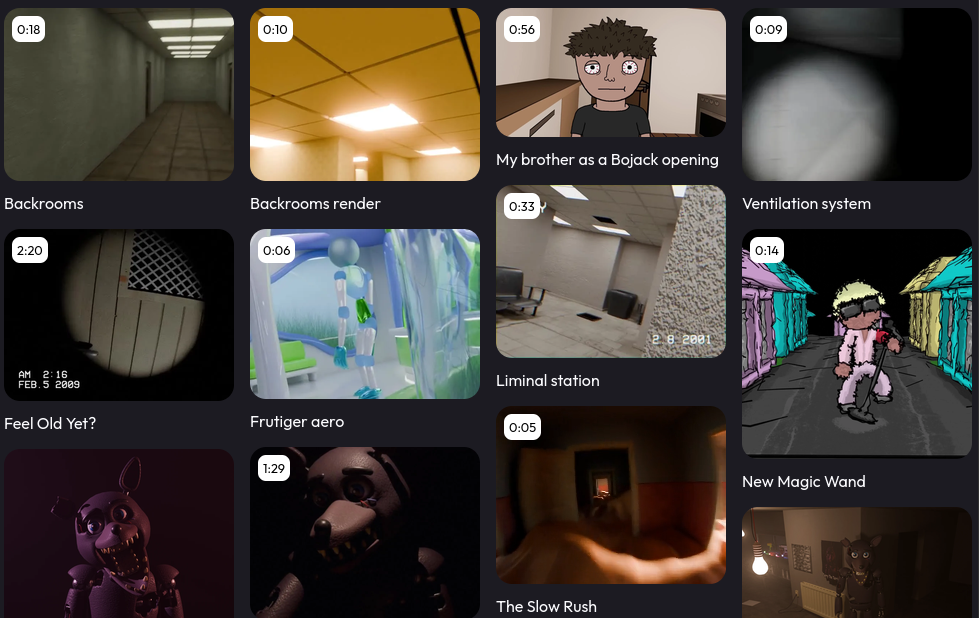
Next step was creating a page for each art piece.
Individual art pages #
Eleventy has this awesome feature called Pagination. That was the hardest part to wrap my head around, but I eventually did.
I'll show you how it works.
Frontmatter in art-piece.liqid:
---
pagination:
  data: "art-pieces"
  size: 1
  alias: "piece"
permalink: "/art/{{ piece.title | slug }}/"
---
This iterates over art-pieces, and for each key it applies this template. You can see that the value of permalink key is actually also a template. Due to that, the pagination creates a different page for each key. And the permalink is created the same way as the links on the main page are.
Inside this paginated template, I can then use the piece object that refers to the current art piece form art-pieces.json
<div class="art-section">
  <img src="{% cloudinaryImg piece.cloudinaryId %}" alt="{{piece.alt}}" />
</div>

<div class="info-section">
    <h1>{{ piece.title }}</h1>
    <b>{{ piece.date }}</b>
    <p>{{ piece.desc }}</p>
</div>This is, again, heavily simplified to be easier to understand. For example, there's no handling of videos in this example.
Another nice thing about Eleventy pagination is that you get previous and next links for free:
{% if pagination.href.previous %}
    <a href="{{ pagination.href.previous | url }}">Previous</a>
{% endif %}

{% if pagination.href.next %}
    <a href="{{ pagination.href.next | url }}">Next</a>
{% endif %}
Art piece pages ended up looking like this:
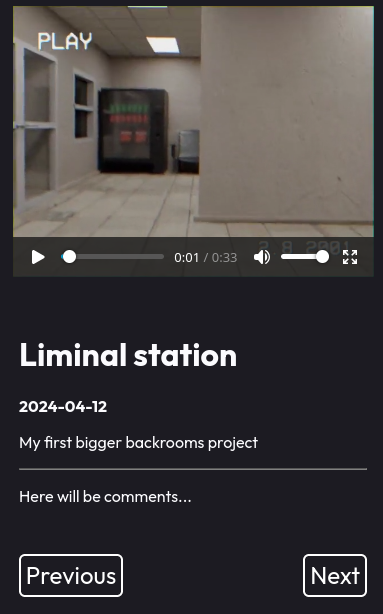
Since it's a static website, comments have to be added using some third-party service. I decided to leave that on Frank.
I polished the website, added styles, meta tags, 404 page, and other uninteresting stuff.
Deployment #
While I hate GitHub and use it only when really necessary, I still decided to go with it.
Firstly, it's super easy to enable static site hosting on any repo, which then gets it's own .github.io domain. GitHub actions can build the Eleventy website on each commit.
Secondly, Frank can edit the json file directly from the web interface, and he's already familiar with GitHub.
He doesn't have to care about the underlying technology at all. He uploads his art to Cloudinary, adds it into the json file from his browser without ever touching git, and the website magically updates.
If you want to look at the source code, the whole repo is here. Leave a star while you're at it ;)
Final result #
👉👉👉Visit the website HERE! 👈👈👈
Or, if you are really lazy, here's an embedded iframe: